Table#
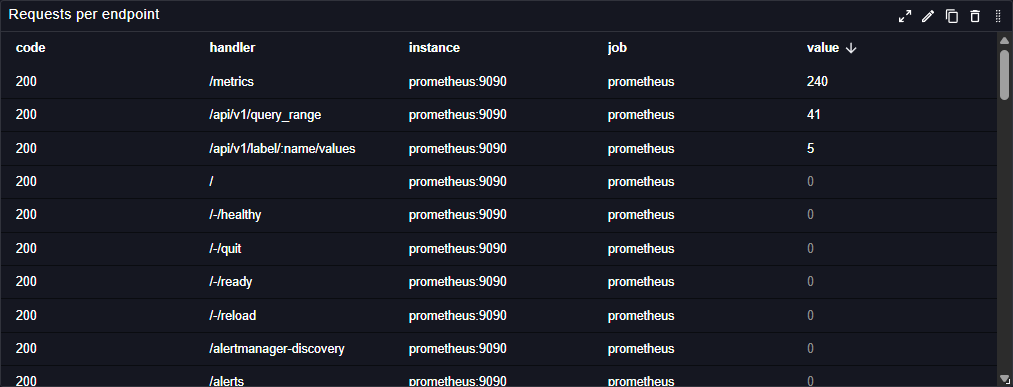
The Table plugin displays data in a structured tabular format in Perses dashboards. This panel plugin provides flexible table visualization with support for sorting, formatting, and custom columns.
Main customizations#
- General settings: configure table-wide behavior like pagination and column filtering.
- Column settings: customize each column independently (for example configure unit & visibility, add external link, define conditional formatting rules).
- Cell settings: define conditional formatting rules that apply globally across matching cells.
- Item actions: add row/item selection actions to trigger links or interactions from selected items.
- Transformations: define transformations to manipulate data before rendering
Cell links#
The cell link feature turns static tables into powerful navigation hubs. By pulling cell values and variables directly into your URLs, you can build context-aware links that bridge your dashboards with other workflows.
Under Column Settings, use the LINK section to turn column data into clickable hyperlinks.
- URL: Define the destination address for the entire column.
- Name: Provide a display label for the link (if different from the cell value).
- Open in new tab: Enable this to open the link in a separate browser tab instead of the current window.
Dynamic links#
The URL field supports the use of variables to create dynamic links. This allows the destination of the link to change based on the available variables and adjacent cells values. You can embed variables directly into your URL string. When a user clicks the link, Perses will replace the variable name with its current relative value. In the following example, both the project and the dashboard are looked up from the variables.
http://example.com/projects/$__project/dashboards/$__dashboard?var-job=avalanche&start=$__range&refresh=0s
Perses uses the ${__data.fields["column_name"]} syntax to embed data into your URLs. This allows you to reference the value of the clicked cell or any other cell in the same row.
To include a value from a specific column, use the column's name as the key.
In the following example, adjacent cell values have been embedded into the link
http://example.com/${__data.fields["code"]}/${__data.fields["job"]}/${__data.fields["__name__"]}/${othervar}/
Perses supports formatting modifiers to control how values are embedded into links. By adding a suffix like :csv to your field reference, you can automatically transform raw data into specific formats, such as a comma-separated list, to ensure compatibility with your destination query or dashboard. For example,
The following interpolations are supported by Perses
- csv
- distributed
- doublequote
- glob
- json
- lucene
- percentencode
- pipe
- prometheus
- raw
- regex
- singlequote
- sqlstring
- text
- queryparam
Cell values embedded into links are URL encoded by default. Use the raw format to skip encoding for complete URLs:
Transformations#
Transformations let you run post-processing on data after it is retrieved from the backend and before it is rendered. They are especially useful for applying manipulations that the queried backend does not support.
The Table panel supports multiple kind of transformations:
Merge columns#
This transformation allows to merge multiple columns into a single one.
Before:
| timestamp | value #1 | value #2 | mount #1 | mount #2 |
|---|---|---|---|---|
| 1630000000 | 1 | / | ||
| 1630000000 | 2 | /boot/efi | ||
| 1630000000 | 3 | / | ||
| 1630000000 | 4 | /boot/efi |
After:
| timestamp | MERGED | mount #1 | mount #2 |
|---|---|---|---|
| 1630000000 | 1 | / | |
| 1630000000 | 2 | /boot/efi | |
| 1630000000 | 2 | / | |
| 1630000000 | 3 | /boot/efi |
Merge series#
This transformation merges series that define the same labels
Before:
| timestamp | value #1 | value #2 | mount #1 | mount #2 | instance #1 | instance #2 | env #1 | env #2 |
|---|---|---|---|---|---|---|---|---|
| 1630000000 | 1 | / | test:44 | prd | ||||
| 1630000000 | 2 | /boot/efi | test:44 | prd | ||||
| 1630000000 | 5 | / | test:44 | prd | ||||
| 1630000000 | 6 | /boot/efi | test:44 | prd |
After:
| timestamp | value #1 | value #2 | mount | instance | env |
|---|---|---|---|---|---|
| 1630000000 | 1 | 5 | / | test:44 | prd |
| 1630000000 | 2 | 6 | /boot/efi | test:44 | prd |
Merge indexed columns#
This transformation merges all indexed columns into a single one.
Before:
| timestamp #1 | timestamp #2 | value #1 | value #2 | instance #1 | instance #2 |
|---|---|---|---|---|---|
| 1630000000 | 55 | toto | |||
| 1630000000 | 33 | toto | |||
| 1630000000 | 45 | toto | |||
| 1630000000 | 112 | titi | |||
| 1630000000 | 20 | titi | |||
| 1630000000 | 10 | titi |
After merge with column="value":
| timestamp #1 | timestamp #2 | value | instance #1 | instance #2 |
|---|---|---|---|---|
| 1630000000 | 55 | toto | ||
| 1630000000 | 33 | toto | ||
| 1630000000 | 45 | toto | ||
| 1630000000 | 112 | titi | ||
| 1630000000 | 20 | titi | ||
| 1630000000 | 10 | titi |
Join by column value#
This transformation merges rows that have equal cell value in the given column. If there are multiple lines with same value, next row values override the current one.
Before:
| timestamp #1 | timestamp #2 | value #1 | value #2 | instance |
|---|---|---|---|---|
| 1630000000 | 150 | toto | ||
| 1630000000 | 10 | toto | ||
| 1630000000 | 45 | toto | ||
| 1630000000 | 1 | titi | ||
| 1630000000 | 99 | titi | ||
| 1630000000 | 10 | titi |
After join on column "instance":
| timestamp #1 | timestamp #2 | value #1 | value #2 | instance |
|---|---|---|---|---|
| 1630000000 | 45 | toto | ||
| 1630000000 | 10 | titi |
Other example with join on "mount":
Before:
| timestamp | value #1 | value #3 | mount |
|---|---|---|---|
| 1630000000 | 1 | / | |
| 1630000000 | 2 | /boot/efi | |
| 1630000000 | 3 | / | |
| 1630000000 | 4 | /boot/efi |
After:
| timestamp | value #1 | value #3 | mount |
|---|---|---|---|
| 1630000000 | 1 | 3 | / |
| 1630000000 | 2 | 4 | /boot/efi |
References#
See also technical docs related to this plugin: