Release v0.53.0#
Welcome to Perses v0.53.0! In this release, on top of many improvements and bug fixes, we have introduced several changes that break the compatibility with previous versions.
These changes have been thought through carefully to improve the overall user experience and maintainability of Perses. We hope even if it will make the upgrade process a bit more complex, you will stay with us and enjoy the benefits of these improvements.
While you can read this blog post to have details about the changes and how to upgrade, we are also providing a migration guide that is more condensed and focused on the steps required to upgrade from previous versions to v0.53.0.
On a different topic, we are happy to be able to list Logz.io as a new official company using Perses in production. Welcome to the Perses community!
If you are a company using Perses or contributing to it and want to be listed as an adopter, please follow the guideline. It is always great to see more and more companies trusting Perses for their monitoring needs. And it will help us to grow the community and make Perses even better.
As usual, this blog post does not cover all the changes and improvements included in this release. We are only talking about the changes that should interest you the most. If you want to have a complete list of all the changes, please refer to the changelog
Introduction of plugin version and registry#
To enhance the management of plugins specially when dealing with upgrading a plugin version that may introduce breaking
changes, we introduced a new field in the plugin specification called metadata. It includes a version field that
allows to specify the version of the plugin and the registry field that indicates the source registry of the plugin.
Now a plugin specification looks like this:
kind: TimeSeriesChart
metadata:
  version: v0.1.0
  registry: perses.dev
spec:
# ... rest of the plugin spec
Note that the version is following the semantic versioning format (semver) and this is enforced during the loading of the plugin.
This change is important as it will allow in the future to manage multiple versions of the same plugin and facilitate the migration from one version to another. We are planning to introduce automatic migration tools in future releases to help users upgrade their plugins seamlessly. Except if a plugin is introducing breaking changes that cannot be automatically handled, the upgrade process will be handled by the Perses backend using cuelang script contained in the plugin package.
What does it change?#
For end users using the Perses application, this change is transparent and does not require any action.
However, for plugin developers, you will need to update the CLI to the last version. This is required as the API handling the load of the plugins in development has changed. Therefore, previous versions of the CLI won't be able to send the data to the server to load plugin in development. The error returned by the server will be 405 (Method Not Allowed). (see https://github.com/perses/perses/issues/3789)
If you want to see the changes and more details regarding how it is implemented, they are available in this PR: https://github.com/perses/perses/pull/3711
TLS config changes#
We are introducing a breaking change in the TLS configuration to have a consistent syntax to define TLS settings across all data-sources specifications and across all backend sub configurations.
The previous version was mixing two syntaxes to set TLS across the various possible configuration that could lead to confusion (camelCase and snake_case). This breaking change is impacting only the SQL database configuration.
In the SQL configuration, if the tls_config is used, then you should change your config like that:
ca_file -> caFile
cert_file -> certFile
key_file -> keyFile
server_name -> serverName
insecure_skip_verify -> insecureSkipVerify
min_version -> minVersion
max_version -> maxVersion
User used in the container#
In order to simplify the build of the docker image, we have changed the default user used in the container from nobody
to nonroot. As a based image we are using now gcr.io/distroless/static-debian12:non-root instead of
gcr.io/distroless/static-debian12:latest, which gives us a non-root user by default.
What does it change?#
This change can impact users who are using as a database the file system inside the container, specially when running
the container with docker (not within Kubernetes). In that case, you should ensure that the nonroot user has the right
permissions to read and write into the database folder. If this is not the case, when upgrading the image, you will face
permission errors when Perses is trying to load the data coming from the file system.
Authentication changes#
A new OIDC logout endpoint has been added to the API, allowing users to log out both from Perses and from their OIDC
provider, respecting
the OpenID Connect RP-Initiated Logout 1.0
specification.
This is mainly used by the frontend to ensure a proper provider-side logout when a user signs out.
The feature is currently in beta and disabled by default. It has been successfully tested with Azure AD
and Keycloak, so feel free to try it out.
We also introduced several improvements to the generic OIDC/OAuth2 provider system:
- The
apiPrefixconfiguration is now correctly applied during login redirections. - The OAuth2/OIDC
stateparameter is now more secure, enabling compatibility with providers such as Authelia.
Improving "Run Query" button behavior in MultiQueryEditor#
What does it change?#
If you are developing plugin specially query plugin or embedding MultiQueryEditor in your app, these changes will impact you, and you need to follow these guidelines.
MultiQueryEditor component has a new mandatory method: onQueryRun. It will be called when the user click on the
button "Run Query". It's useful if you want to execute a query only when this button is clicked and not on every
onChange (previous Perses behavior). Now the onChange method is always called when something change in the editor.
On the Perses app, queries are only executed when the user click on the "Run Query" button, however changes are still
saved
if user save the dashboard without clicking on "Run Query". But embedded use-cases might want to execute queries on
every change,
so this new behavior allows both use-cases.
In parallel, the caching of queries has been greatly improved to avoid memory leaks on dashboard refresh. More info can be found in related PR: #3518 And queries errors are now displayed at the query level (before it was only displayed at the panel level, could be hard to know which queries are causing issues).
About the breaking change, your code should change from this:
export function FooExplorer(): ReactElement {
    const {
        data: {queries = []},
        setData,
    } = useExplorerManagerContext<FooExplorerQueryParams>();

    return (
        <Stack gap={2} sx={{width: '100%'}}>
            <MultiQueryEditor
                queryTypes={['ProfileQuery']}
                queries={queries}
                onChange={(newQueries) => setData({queries: queryDefinitions})}
            />
            <FooPanel queries={queries}/>
        </Stack>
    );
}
to this:
export function FooExplorer(): ReactElement {
    const {
        data: {queries = []},
        setData,
    } = useExplorerManagerContext<FooExplorerQueryParams>();

    const [queryDefinitions, setQueryDefinitions] = useState<QueryDefinition[]>(queries);

    return (
        <Stack gap={2} sx={{width: '100%'}}>
            <MultiQueryEditor
                queryTypes={['ProfileQuery']}
                queries={queryDefinitions}
                onChange={(newQueries) => setQueryDefinitions(newQueries)}
                onQueryRun={() => setData({queries: queryDefinitions})}
            />
            <FooPanel queries={queries}/>
        </Stack>
    );
}
Variable migration changes#
We realized variable migration script could be simplified & better follow CUE's good practices by replacing condition
blocks by constraints defined on the variable object. However to enable this we had to introduce a breaking change*:
where previously such schema was describing the remapping of a Grafana variable object named #var, it is now called
#grafanaVar. Thus, if you had defined a schema looking like this:
package migrate

import "strings"

#var: _

if #var.type == "custom" || #var.type == "interval" {
    kind: "MyVariable"
    spec: {
        values: strings.Split(#var.query, ",")
    }
}
..the minimum change you need to do is this renaming:
package migrate

import "strings"

#grafanaVar: _

if #grafanaVar.type == "custom" || #grafanaVar.type == "interval" {
    kind: "MyVariable"
    spec: {
        values: strings.Split(#grafanaVar.query, ",")
    }
}
Then it is recommended to refactor to something like this:
package migrate

import "strings"

#grafanaVar: {
    type: "custom" | "interval"
    query: string
    ...
}

kind: "MyVariable"
spec: {
    values: strings.Split(#grafanaVar.query, ",")
}
*We believe the trade‑off was worth introducing this breaking change, as we expect very few (if any) people to have written such variable migration schemas outside of the Perses organization. However, if you are impacted, please reach out to us! Learning more about our community helps us make better future decisions by having a clearer understanding of potential impacts.
Introducing i18n support#
This new version is introducing internationalization (i18n) support in the frontend, allowing to easily add new
languages and provide a better experience for non-English speaking users. The i18n implementation is based on the widely
used react-i18next library, which provides a powerful and flexible solution for managing translations in React
applications.
For the moment, the i18n is really limited as it only contains a few translations for few languages. The main goal of this change is mainly to get the i18n support in place and have a framework to easily add new translations in the future.
Kubernetes Auth#
This release introduces Kubernetes authentication and authorization providers, enables authorization decisions for users
based on Kubernetes RBAC checks against Perses CRDs. This change marks a forward step in Perses Kubernetes integration
story, allowing Perses CRDs to not just create resources but be used in conjunction with Kubernetes Roles and
RoleBindings to provide access checks for users within Perses itself. Due to the variety of authentication providers
for Kubernetes, the implementation is designed to be provider agnostic. When enabled, Perses expects requests to contain
an Authorization header in the form of Authorization: Bearer XXXX. The token is used to authenticate against the
Kubernetes API Server and check if the user has permission to requested namespaces and resources.
The concept of authorization providers has been added with this change, marking the
.security.authorization.guest_permissions and .security.authorization.check_latest_update_interval fields as
deprecated, moving them to the "native" authorization provider. These fields will be removed in a future release.
security:
  authorization:
    provider:
      native:
        enable: true
        check_latest_update_interval: 5m
        guest_permissions:
        # ...
The frontend and percli have been updated to support these new providers. An /api/v1/user/whoami endpoint has been
created to return user information for a logged in user. The percli has had --kube and --kubeconfig-file flags added
which use the bearer token present in a kubeconfig file to authenticate with the Perses backend.
percli login --kube --kubeconfig-file="./kubeconfig" http://localhost:8080
successfully logged in http://localhost:8080
The Kubernetes authentication and authorization providers must be enabled together. When enabled, the Perses backend
will use its pod's service account to authenticate and authorize users. The service account should be given
TokenReview and SubjectAccessReview create and Namespace list permissions. The authenticator and authorizer
provider configurations are exposed as configuration options:
security:
  enable_auth: true
  authorization:
    provider:
      kubernetes:
        enable: true
        qps: 500
        burst: 1000
        authorizer_allow_ttl: 5m
        authorizer_deny_ttl: 30s
        authenticator_ttl: 2m
  authentication:
    providers:
      kubernetes:
        enable: true
CLI improvements#
plugin test-schemashas been improved to test that the actual migrated schemas are valid against the expected schemas.plugin startis now able to discover the port used by rspack to serve the plugin in development mode, so you don't need to provide it anymore.- There was also an issue when loading a plugin in development with no schema defined, it is now fixed.
- When stopping the command, there was some orphan process left, it is now fixed.
- As mentioned before, the CLI has been updated to be compatible with the new dev plugin API introduced in this release.
lint: when you were using local plugin to validate the dashboards, it was mandatory to have the plugins extracted in a folder. Now you can also provide the plugins as an archive like it is the case for the Perses server. The command will extract the plugins before starting validating any data.
Support of Dashboard Tags#
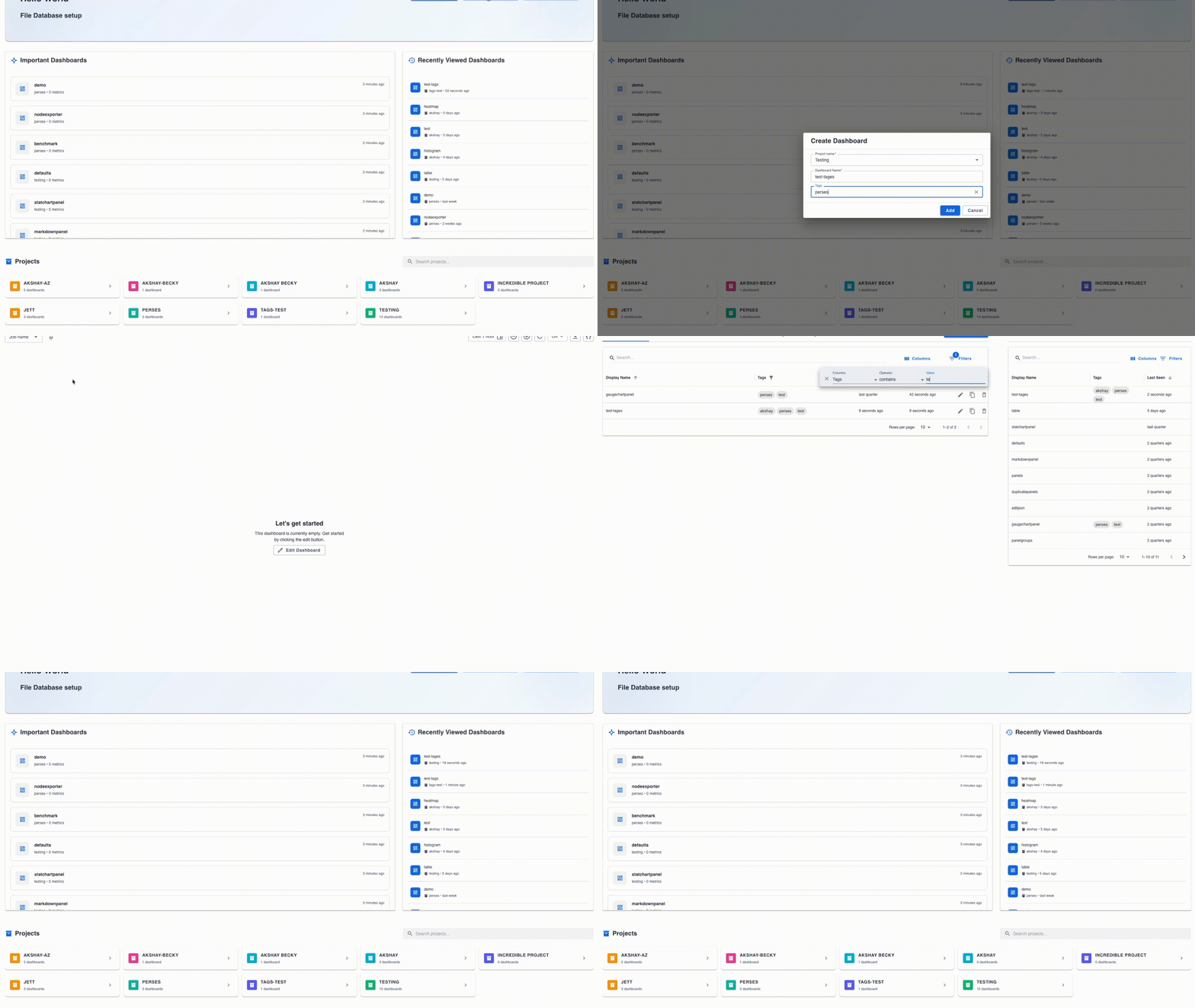
This release adds support for dashboard tags, allowing users to organize and categorize their dashboards more effectively. Tags provide a convenient way to search for and filter dashboards. You can assign multiple tags to any dashboard and use them to quickly find related dashboards across your Perses instance.
Timezone selector#
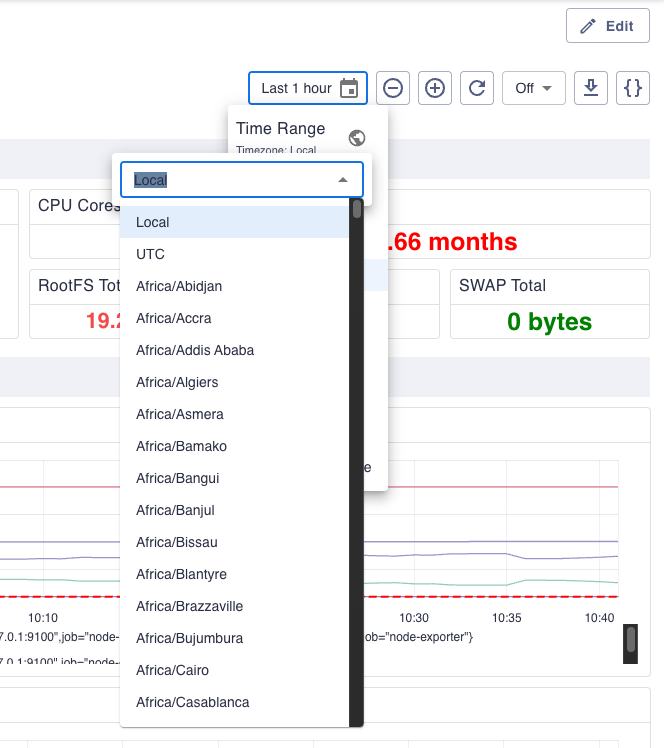
Thanks to Christoph Richter from the community, a timezone selector has been added to the dashboard settings, allowing users to choose the timezone for their dashboards.
This is a long time wanted feature that is finally available in this release. The work was started initially by Aditya Pimpalkar and then completed by Christoph. Thanks to both of them for their contribution!
The timezone selector is available in the dashboard time settings. By default, the timezone is set to "Local", which means that the dashboard will use the local timezone of the user's browser. However, users can change it to any timezone they want, and the dashboard will display the data accordingly.
In case you are changing the timezone and then you are sharing the link of the dashboard, the timezone will be preserved in the URL, so the person who is opening the link will see the dashboard in the same timezone as the one who shared it.
Plugin improvements#
Table plugins actions and selections#
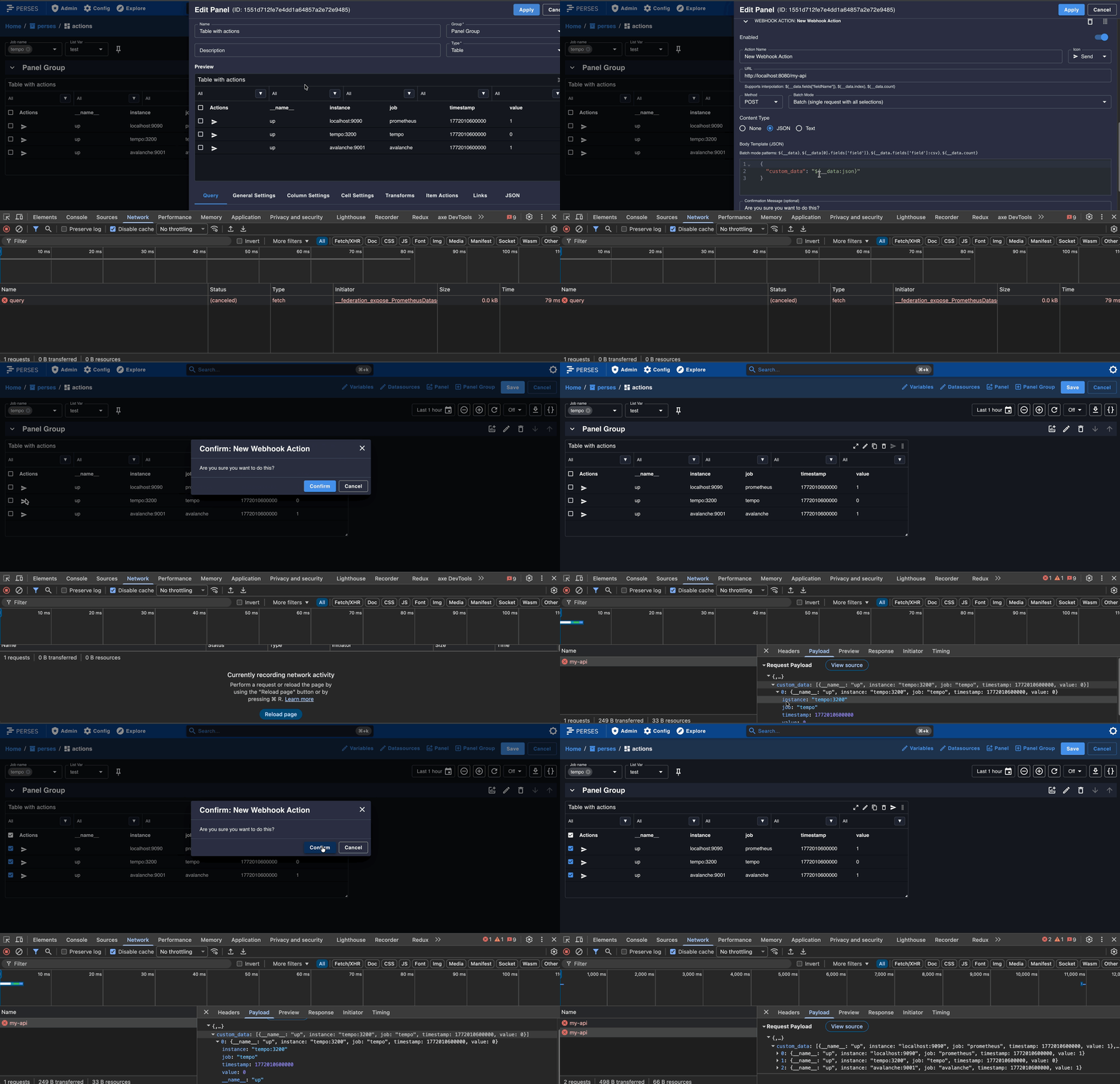
This release adds support for table actions, allowing users to perform custom defined actions based on table data either in bulk or individually with a new selection provider. These are the supported action types:
- Webhook: Makes an HTTP request to a specified URL with the configured method.
- Event: Triggers a custom Javascript event with the selected data as the payload.
Action payloads are defined as templates, and use the same variable replacement syntax allowing flexible integrations.
This change was added to all the table plugins including: Table, TimeSeriesTable, LogsTable and TraceTable.
The following configuration will allow to execute actions in bulk for the selected rows, this is possible clicking on the action on the panel header. The action can also be executed in individual rows clicking on the action icon for each row.
GO-SDK Change in the way to define a query plugin#
In the previous version of the GO-SDK, a query plugin was defined by using the Query builder. The issue with this approach is that it was not possible to provide the high level query type as it was hardcoded in the query builder.
This was not a problem for the Perses app as we only have one query type until recently. It changed with the introduction of the new query types: "ProfileQuery", "LogQuery" and "TraceQuery". To support this new use-case, we had to introduce a breaking change in the way to define a query plugin.
Now, instead of using the Query builder, you need to fill a struct query.Option that contains the query plugin and the
high level query type.
If we take the Prometheus plugin as an example, the implementation will change from this:
package query

import (
    "github.com/perses/perses/go-sdk/query"
)

func PromQL(expr string, options ...Option) query.Option {
    return func(builder *query.Builder) error {
        plugin, err := create(expr, options...)
        if err != nil {
            return err
        }

        builder.Spec.Plugin.Kind = PluginKind
        builder.Spec.Plugin.Spec = plugin
        return nil
    }
}
to this:
package query

import (
    "github.com/perses/perses/go-sdk/query"
    "github.com/perses/perses/pkg/model/api/v1/common"
    "github.com/perses/perses/pkg/model/api/v1/plugin"
)

func PromQL(expr string, options ...Option) query.Option {
    plg, err := create(expr, options...)
    return query.Option{
        Kind: plugin.KindTimeSeriesQuery,
        Plugin: common.Plugin{
            Kind: PluginKind,
            Spec: plg,
        },
        Error: err,
    }
}
Support of temperature units#
Celsius (°C) and Fahrenheit (°F) temperature units are now available for panel plugins that support unit configuration.
Introducing VictoriaLogs and ClickHouse as new data-sources#
On top of that, this release is also introducing two new data-sources: VictoriaLogs and ClickHouse provided directly by the community.
Note that since these two data-sources are provided by the community, they are not officially supported by the Perses team. And as such, soon we will come with a governance model to manage community plugins. In later release, these plugins might be removed from the main images, depending on the governance adopted. You will still be able to use them by installing the datasources in your Perses instance.